
How to Read Janoshik Lab Reports for Peptides
Complete Guide & Evidence (2026)
Learn how to read a third-party peptide lab report by checking identity, purity, quantity, and traceability.
Tested Vial Dose Adjuster
Enter your Janoshik (or other lab) results to find out the exact active peptide in your vial and adjust your syringe draw accordingly.
True Net Content
📄 Verify ReportCalculate actual active peptide based on mass and purity.
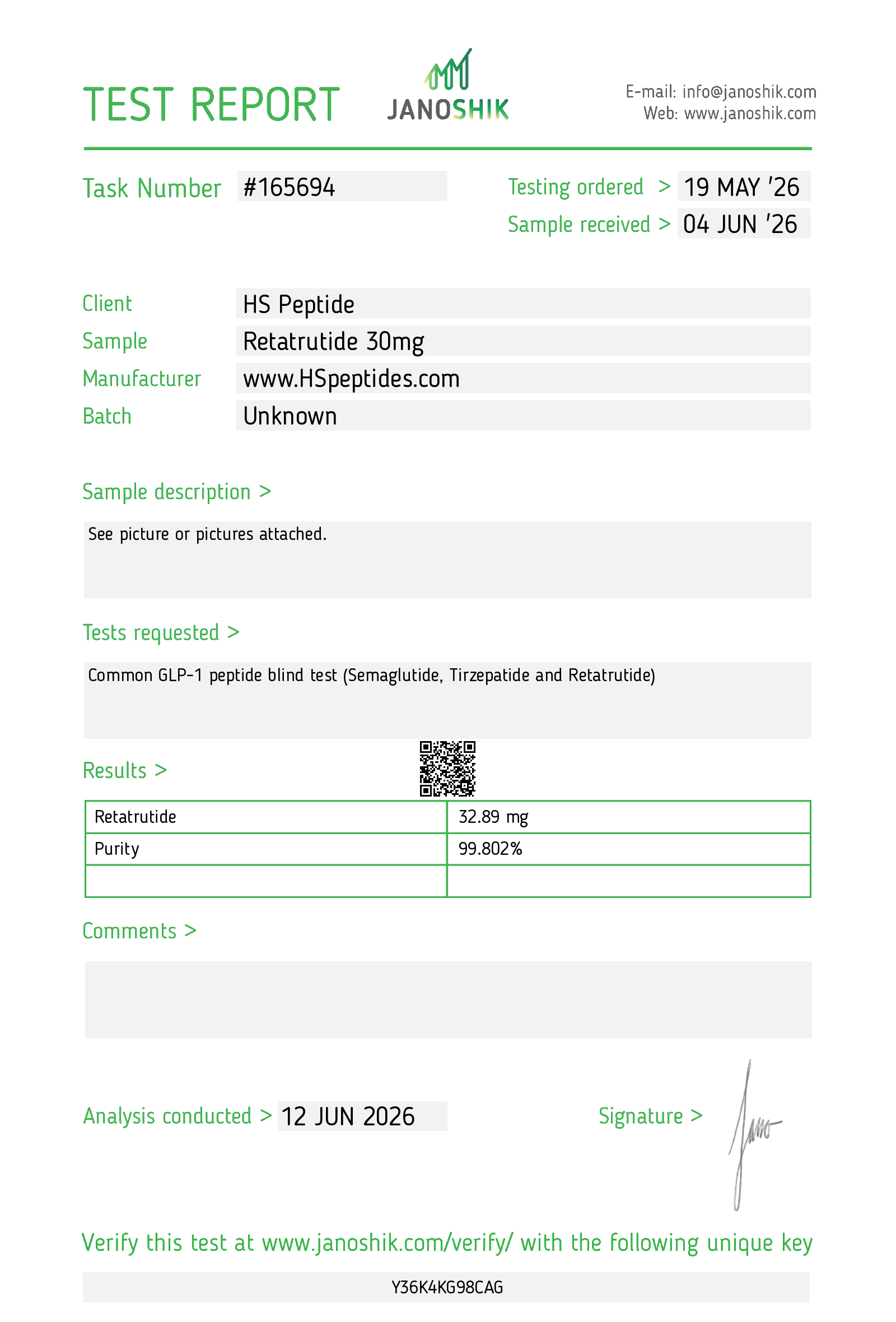
Click the image to view the verifiable report on Janoshik's official website.
Save your lab results to your vials in Shotlee.
Stop re-doing the math. In the free Shotlee app, you can attach Janoshik lab results directly to your logged vials. The app will automatically adjust all your future doses and unit calculations based on the tested purity and quantity.
What a Lab Report Can Tell You
A third-party report can help you compare the stated identity of a material against the measured sample, but it only means something when the lot number, method, and units are clearly documented.
Use the report as a verification tool, not as a blanket safety guarantee. The most useful reports tell you exactly what was tested, how it was tested, and whether the result matches the vial or batch you received.
Key Components of a Report
How to Use the Report Responsibly
Identity First
Start with whether the report actually matches the claimed compound before you look at the rest of the numbers.
Purity Context
Treat purity as one data point, not the whole story. The method and sample quality matter too.
Documentation Matters
Keep the report, lot number, and any packaging details together so you can compare batches later.
Use Caution with Claims
If a report is missing methods, batch identifiers, or clear units, treat it as incomplete rather than definitive.
Track What You Actually Received
Log the batch details and date in Shotlee so you can match any future report to the right vial.
Ask for Better Documentation
If a seller cannot explain the report, stop and ask for the full documentation before relying on it.
Guide FAQs
Janoshik Analytical is an independent third-party lab widely used to test peptide identity, purity, and quantity. A Janoshik report (COA) lets you verify a batch before you trust it.
Check three things: identity (the measured mass matches the expected molecule), purity (the percentage that is the target peptide, often 95%+), and quantity (actual mg vs the labeled amount). A good report shows the right molecule, high purity, and content close to the label.
Use the report’s unique order/verification code on Janoshik’s official verify page and confirm the peptide, batch, date, and values match what you were shown. Screenshots can be edited; the verification portal cannot. No verifiable code means the report is unverified.
Janoshik is a widely used independent analytical lab for peptide testing. A report is only meaningful if it has a verifiable code, matches your exact batch, and documents the method and units — always verify the code rather than trusting a screenshot.
Typically identity (mass spectrometry), purity (HPLC %), and quantity (actual mg). Some reports add sterility or endotoxin testing. It reflects the tested sample, not necessarily every vial in a batch.
Yes. Shotlee logs your doses, batches, lab results, side effects, and weight in one place — free to use.
Log Your Batches & Results in Shotlee
Free dose logging, side effect tracking, and health metric monitoring for your complete protocol.